
For restaurants, lounges & food spots
Get found. Get ordered from. Get packed out.
We put your restaurant on DoorDash, Uber Eats and Grubhub, make menus that sell — printed and on your TVs — get you right on Google and Apple Maps, and put a tap-to-review card on every table.
- Not on the delivery apps yet? We set it up with you.
- On them, but it looks rough? We fix the menu and photos.
- Menu taped to the wall? We put it on TVs.
Free 30-minute call with Christopher(470) 502-9543
1Where hungry people decide
Nobody's hungry and patient. They pick what they find first.
When someone wants food they open Google Maps, Apple Maps or a delivery app, look at photos, stars and prices — and order. If you're not there, or you look worse than the spot down the street, you never even get a chance.
Google & Apple Maps
“food near me”
DoorDash · Uber Eats · Grubhub
the couch crowd
Your stars & reviews
the 2-second decision
The menu on your wall
what they add to the order
The 30-second restaurant checkup
Tap yes or no. Be honest — nobody's watching.
- On DoorDash
- On Uber Eats
- On Grubhub
- Delivery menus have a real photo for every plate
- Google Maps shows your hours, menu and food photos
- You're on Apple Maps with the right hours
- Your menu is on TVs (not paper taped to the wall)
- Every table has a way to leave a Google review
Every “No” is a place hungry customers look for you — and find someone else.
2What we do
Everything between hungry and “order placed.”
One person to call for the apps, the menus, the maps and the reviews — and we keep working with you after it's live.
DoorDash, Uber Eats & Grubhub
New store set up, or your messy one rebuilt: photos for every plate, clear names, correct prices, add-ons and hours.
Digital menus on your TVs
We design menu boards that sell — photos, big prices, a lunch special, a “make it a meal” upsell — and install them on your TVs.
Printed table & to-go menus
Table, counter and to-go menus that match your TVs and your delivery apps, so you look like one restaurant everywhere.
Google Maps & Apple Maps
Right hours, menu, food photos and a one-tap order or call button, so “food near me” searches find you open.
A review card on every table
Guests tap their phone on the card and your Google review form opens. More reviews, higher on the map.
Ads that fill tables
When the basics are set, local Meta and Google ads that send nearby people to your door or your delivery page.
3Real work, real restaurant
Exclusive Restaurant & Lounge. Menus made and on their TVs.
We designed the entrée and drinks boards for Exclusive Restaurant & Lounge in Covington, GA and installed them on their TVs — plus review cards for their tables. This is the actual menu, not a template.
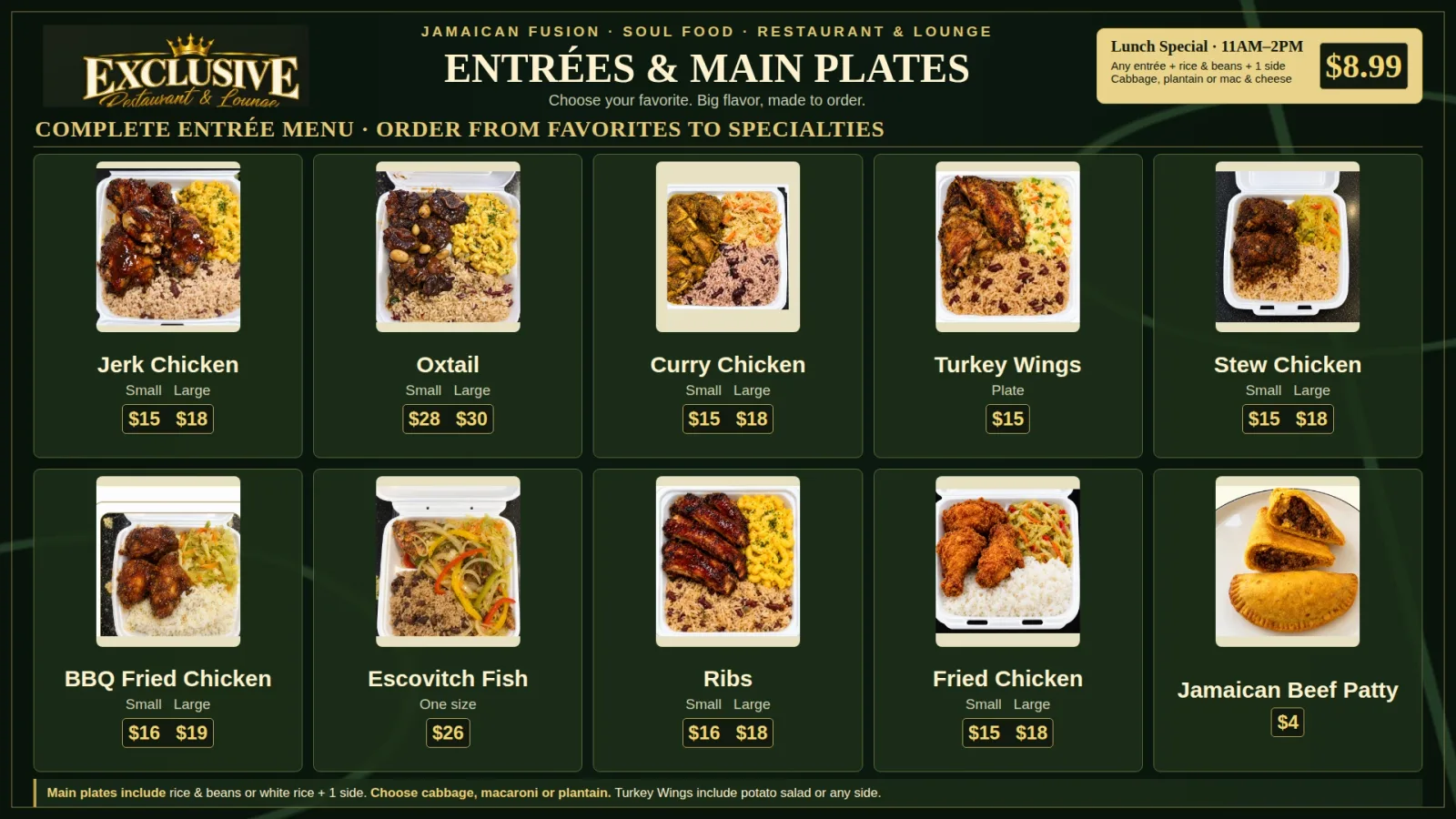
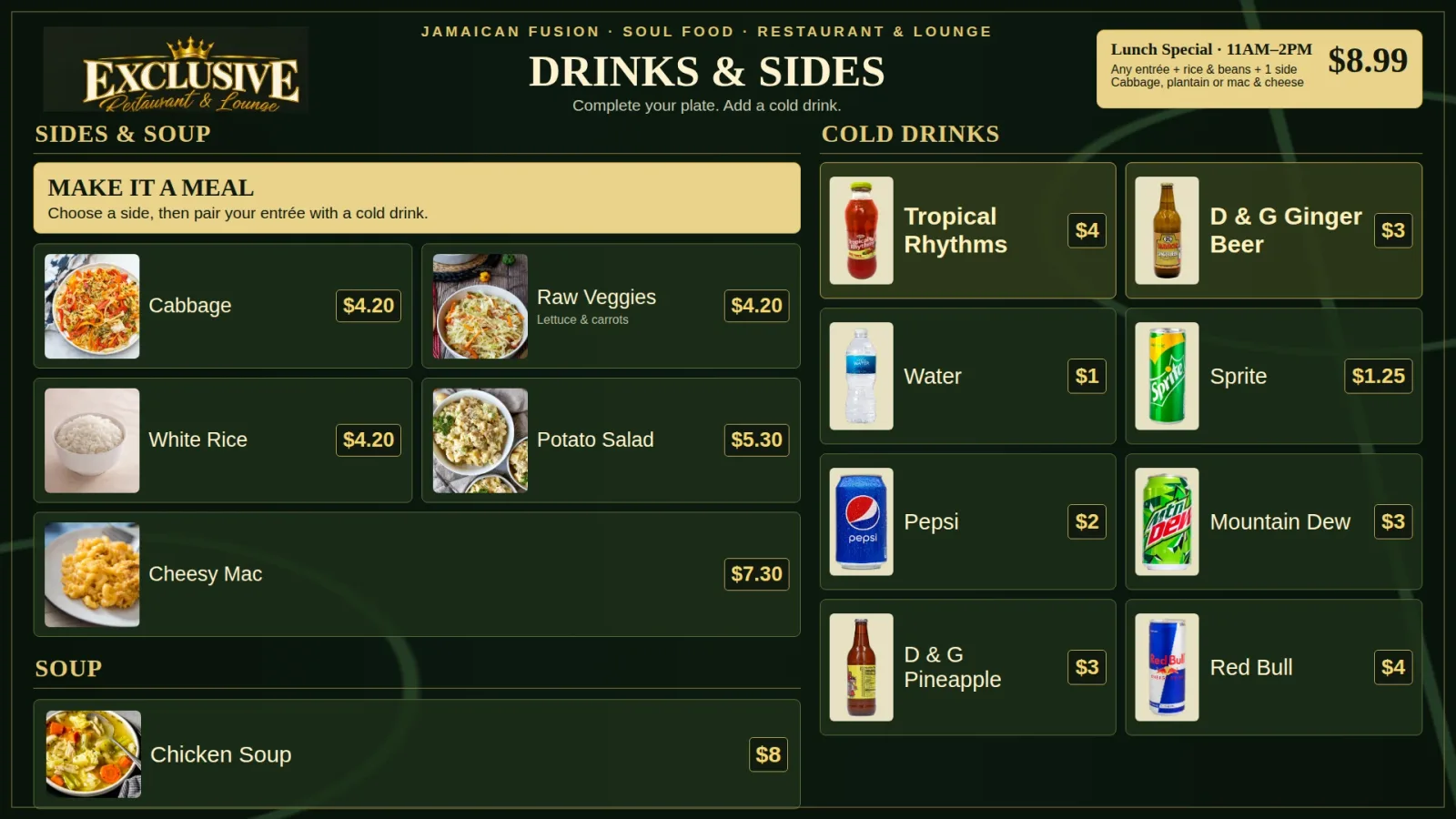
- A photo of every platePeople order what they can see. No guessing what “stew chicken” looks like.
- Prices big and clearSmall and large side by side, so nobody holds up the line asking.
- Lunch special in the cornerAlways on screen — a reason to come back between 11 and 2.
- “Make it a meal” upsellSides and cold drinks right next to the plates. Bigger tickets, no pushy upsell.
4Why every table needs one
Every table without a card is a 5-star review walking out the door.
The best moment to ask for a review is when the plate is clean and they're still smiling — at the table. Not three days later, when they've forgotten your name.
- Drop it with the check or keep one standing on every table.
- They tap, your Google review form opens. No app, no searching your name.
- More reviews, higher on Google Maps — where “food near me” decides who eats where.
Your servers already ask “how was everything?” The card turns “it was great!” into a review that stays up.
Your restaurant
4.8(48)
Illustration — your real count depends on how many guests you ask.
9:41
Hold near the card
Your Business
Rate and review
Fast, friendly and fair!
Type your restaurant name — watch a guest review you.
- 1Guest taps their phone on the table card
- 2Your restaurant's Google review form opens
- 3Stars, one line, post — about 10 seconds
A card on every table
Slide to your table count. We pick the cheapest packs for you.
2 × 5 cards
$159.98
$16.00 per table · one time
Get 10 table cardsFree US shipping · secure Shopify checkout · $0/month
No “free dessert for a review”
Google removes reviews that were paid for with freebies — and can penalize the listing. Ask every guest the same way. The card makes that easy.
- Ask every customer — Google wants reviews from all your customers.
- Reply to reviews, good and bad. It builds trust with the next customer.
- No discounts, freebies or contests in exchange for reviews.
- Don't only ask happy customers or screen people first (“review gating”).
- Never write reviews for customers, or have staff and family review you.
Just want to try one first?
CEO Turbo · Google review cards
NFC Google Review Card — tap, review, done.
Customers tap their phone on the card and your Google review form opens. No searching for your listing, no app — “I'll leave you a review” becomes a review before they walk out.
$39.99
$20.00 per card · Free US shipping
You save $9.99iPhone & Android
Every iPhone XS or newer and NFC Android phones. No app for customers.
One tap, 3 seconds
No searching your name, no scrolling Maps — the review form just opens.
Pay once, reuse forever
No subscription. Re-program it anytime, for any location.
Built to live on a counter
Waterproof PVC, credit-card size, matte finish.
Double-sided: white front, black NFC back
NTAG215 NFC chip · Waterproof PVC, matte finish · 85.5 × 54 mm (credit-card size), 0.76 mm thick
How many?
We'll personalize your setup guide and preview below.
- NFC Google review card(s) — white front, black back
- Step-by-step setup guide (2 minutes)
- Free review-link finder + printable QR for receipts
- Free setup call if you get stuck
Apple Pay · Google Pay · Shop Pay · all major cards
Ships in 1–2 business days from Atlanta, GA. Free US shipping.
Not right for you, or the card won't program or tap? Return it new and unused within 5 days of delivery for a refund. No restocking fee.
Secure checkout powered by Shopify. We never see your card number.
Questions before you order? Call or text (470) 502-9543
See the 5-minute setup guide · Questions? Book a quick call
5How it works
Three steps. You keep cooking.
- 1
Free 30-minute call
We look at your Google, Apple Maps and delivery listings together and find what's costing you orders.
- 2
A fixed price
You get one clear plan — apps, menus, TVs, maps, cards — with a price before any work starts.
- 3
We set it up and stay with you
We build it, install it and keep it updated when your menu, prices or hours change.
Restaurant questions
Still unsure? Ask it on the call — that's what it's for.
Can you get my restaurant on DoorDash, Uber Eats and Grubhub?
Yes. We set up your store and menu on each app with you: categories, photos, descriptions, prices, modifiers and hours. The apps verify that you own the restaurant, so you'll provide things like your business details and payout bank info yourself. Each app sets its own commission and fees — we don't control those or take a cut of your orders.
We're already on DoorDash but the menu is a mess. Can you fix it?
Yes. We rebuild what's there: real photos for every plate, clear names and descriptions, correct prices and add-ons, and hours that match your door. A clean menu is easier to order from.
Do you install the menus on our TVs?
Yes. We design your menu boards and install them on your TVs, like we did for Exclusive Restaurant & Lounge in Covington, GA. If you don't have TVs yet, we'll tell you what to get on the call.
Can you update prices or items later?
Yes. Digital menus are easy to change when prices or items change. Tell us on the call how often you update your menu and we'll set it up for that.
Do you make printed menus too?
Yes — table menus, counter menus and to-go menus that match your TV boards and delivery menus, so everything looks like one restaurant.
How do the review cards work at a table?
Each card has an NFC chip programmed with your Google review link. A guest holds their phone near it and your Google review form opens — no app, no searching. Drop it with the check, or keep one standing on every table.
Can we give a free dessert for a review?
No. Google doesn't allow discounts, freebies or contests in exchange for reviews, and it can remove reviews that break the rules. Ask every guest the same way — the card just makes it a 10-second tap.
How much does it cost?
Review cards start at $24.99 and you can buy them right on this page. Delivery app setup, menus and TV installs are a fixed price we give you on the free call, based on what your restaurant actually needs — no surprise monthly fees.
Let's get your restaurant packed out.
Free 30-minute call. Bring your menu — we'll show you exactly where you're losing orders and what it costs to fix.
Rather talk now? Call or text (470) 502-9543.
DoorDash, Uber Eats, Grubhub, Google and Apple are trademarks of their owners. CEO Turbo is not affiliated with or endorsed by them; each app sets its own fees and approval rules. The dining room above is an illustration.